



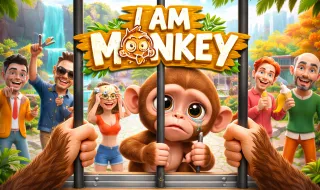
I am Monkey
Play I Am Monkey, a chaotic sandbox zoo game where you act like a monkey, react to visitors, complete missions, and create hilarious moments.
What Is I Am Monkey?
I Am Monkey is a lighthearted sandbox game that places you inside a zoo cage—but not as a visitor. You play as the monkey. From behind the bars, you watch humans approach, stare, feed you, tease you, or cause trouble. What happens next depends entirely on how you choose to react.
Some visitors are kind and generous, while others are loud, annoying, or aggressive. There’s no single “right” way to play. You can behave, mess around, or fight back. Every choice affects how your day at the zoo unfolds.
A Monkey’s Daily Chaos
Your cage isn’t just a place to stay—it’s your personal playground. Nearly everything around you can be picked up, moved, or thrown. Bananas, cameras, gifts, and random items quickly turn into toys, tools, or weapons when things get messy.
You can hop across bars, swing around the enclosure, and mess with visitors in all kinds of unexpected ways. Thanks to the goofy physics, even simple actions can lead to funny, chaotic moments.
Visitors don’t act the same way twice. Some are nice and just want to interact, others tease you for fun, and a few go too far. Whether you ignore them, joke around, or fight back changes how the situation plays out—and how future visitors treat you.
Missions, Progress, and Surprises
To give the chaos some direction, a wise elephant hands out simple and humorous missions. Completing them unlocks new abilities, items, and visitor types, helping you progress without taking away your freedom.
As you keep playing and reacting, the zoo slowly evolves. New situations appear, encounters feel different, and every session becomes its own unpredictable story.
Controls
PC
- Move: W / A / S / D
- Jump: Space
- Attack / Hit: Left Mouse Button
- Pick Up Items: E
- Drop Items: R
- Throw Objects: F
- Camera: Move the mouse
- Get Missions: Approach the elephant and interact
Mobile
- Move: On-screen joystick
- Jump: Tap the Jump button
- Attack / Hit: Tap the Attack button
- Interact with Items: Tap the Interaction button
- Get Missions: Approach the elephant and tap Interaction
- Camera: Swipe the screen
Quick Tips for New Monkeys
- Use the environment creatively—almost everything has a purpose
- Observe visitors before reacting; not all of them mean trouble
- Change your playstyle to unlock different encounters
- Complete elephant missions early to unlock content faster
- Sometimes doing nothing leads to the funniest outcomes
Other Simulation Games


Blockpost



Jelly Runner

Steal a Car


Moto X3M
Pixel.io

Slide Down

Tiny Arena

Santa Run