


Paper Minecraft
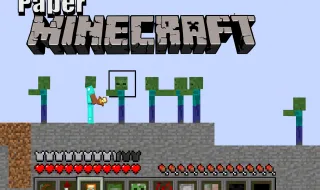
Paper Minecraft is a 2D reimagining of the iconic Minecraft experience, combining the charm of Scratch creations with the depth of classic sandbox gameplay. Instead of exploring a 3D cube world, players step into a side-scrolling, paper-styled environment filled with biomes, creatures, resources, and endless opportunities to build or survive.
The World of Paper Minecraft
Paper Minecraft captures the essence of the original Minecraft but presents it on a flat 2D plane similar to Terraria. Before entering the game, players choose their character skin, world type, and game mode—each shaping the experience ahead.
Creative Mode
In Creative Mode, your imagination is the only limit. You have unlimited blocks, instant-breaking power, and the ability to fly across forests, fields, oceans, and mountains. This mode is ideal for building villages, pixel art, structures, or anything else you dream up.
Survival Mode
Survival Mode begins with nothing—no tools, food, or shelter. To stay alive, you must:
- Gather wood, stone, and ores
- Craft tools and weapons
- Hunt animals or farm crops
- Build shelters before nightfall
- Defend yourself from monsters
Fall damage, hunger, and poor planning can easily lead to death, adding challenge and excitement.
Peaceful Mode
Peaceful Mode offers a relaxed version of Survival. Hunger still exists, but your health regenerates, and no hostile mobs appear. It’s perfect for newcomers or players who want a calmer experience.
Controls
Movement
- W or Up Arrow – Jump
- A / D or Left / Right Arrow – Move
- R – Sprint
- R (in water) – Swim
Building & Mining
- Left-Click – Break or place blocks
- 1–9 – Select items
- Inventory & Interaction
- E – Open inventory, chests, or crafting stations
- E + hover – Trade with villagers
Items & Combat
- F – Eat or use item
- Q – Drop items
- Space – Split stack or drop a single item
- Z – Use shield (if equipped)
Other Keys
- O – Save game
- P – Pause
- M – Toggle sound
- V – View achievements
- L – Toggle lag reduction mode
Elytra Controls
- Tap Space while mid-air to glide in the direction of your mouse.
Highlights
- Free to play directly in your browser
- A faithful 2D twist on Minecraft’s core mechanics
- Encourages creativity, exploration, and survival strategy
- Highly replayable with multiple modes and world types
- Simple controls make it accessible for beginners and kids
More Game Like This